Production became the place design starts
Figma captures production pages into editable layers, Cursor reads several elements at once, and Vercel ships an export to a URL by drag. The rendered page is becoming the working file.
Idiom
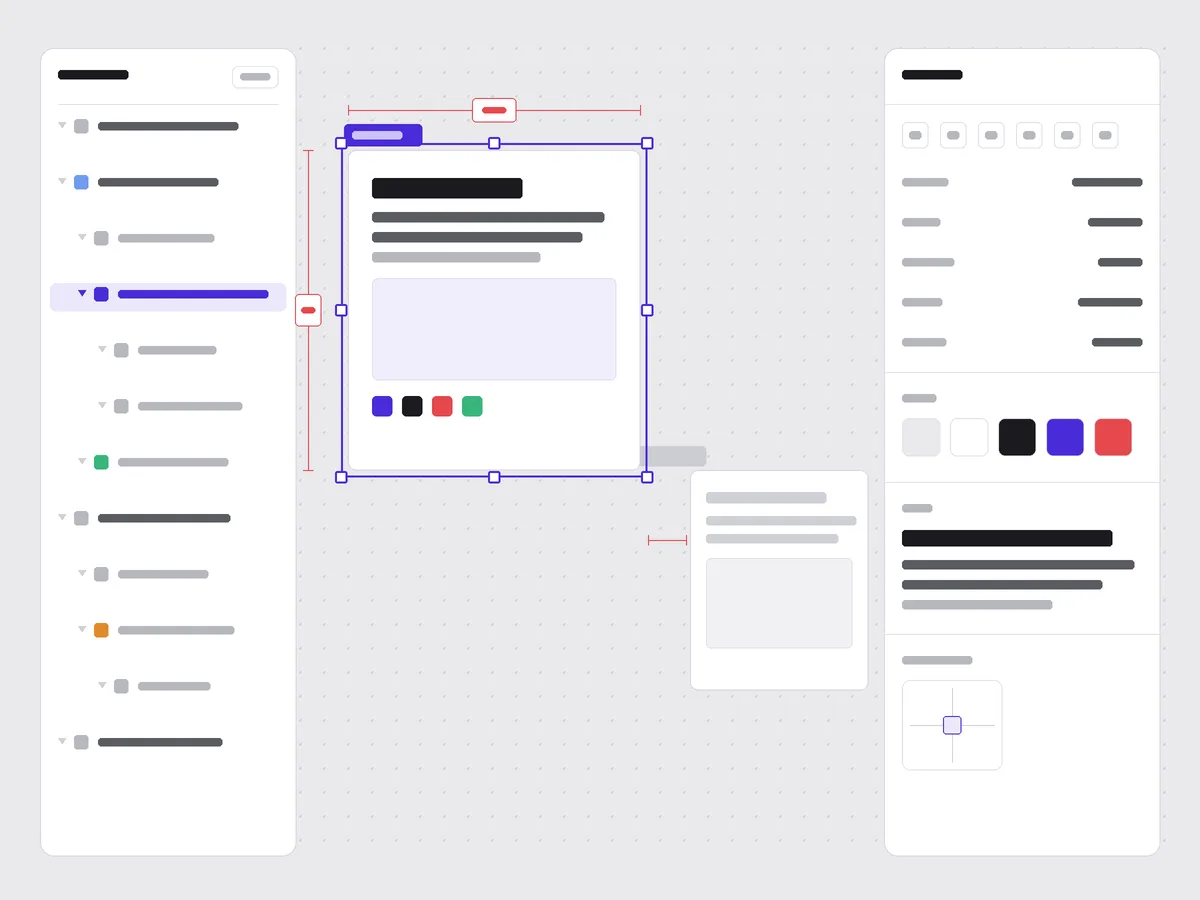
Vector Design-Tool Workspace
A layers panel, a dot-grid canvas of named frames, and a properties inspector reading the selection.
The issue is built like the surface these stories are about: a vector editor. The left rail is a layers tree that doubles as the table of contents. Each section is a framed artboard with a small name tab in the corner, and the one you are reading carries a violet selection outline with corner handles. The right column is a properties inspector, but every value in it is real metadata, the issue number, the date, the palette tokens, the typefaces, not decorative chrome.
Borrow it like this: label each block of a page as a named frame and pin a metadata inspector beside it, so a long read navigates like a design file rather than a plain scroll. Let the selection state carry the color, and keep every value in the inspector real.
Tooling
The browser becomes a place you copy from
Figma can now lift a live page onto the canvas as editable layersfigma.com
Figma’s Chrome extension copies a full page or a single element from any site and pastes it into a design file as structured layers, frames, text, and images you can move and restyle, rather than a flat screenshot. The framing in its help docs is start from production: grab what already ships, then riff. Design-system mapping is still on the roadmap, so captures land as plain layers for now, and the feature is paid-plan beta.
Cursor’s Design Mode now reads several elements at oncecursor.com
Building on the in-browser Design Mode it shipped earlier this month, Cursor added multi-select: click two or more rendered elements and the agent sees their code, their layout, and the visual relationships between them together, which closes the reference gap a text-only prompt leaves open. A mic stays live through the overlay so you can queue the next change by voice while the agent is still working.
Technique
From an export to a URL without touching Git
Vercel Drop deploys a folder or a zip by dragging it into the browservercel.com
Drop a file, a folder, or a .zip onto the page and Vercel creates a project, detects the framework, builds it, and publishes a production URL, no command line and no repository. The guide aims it squarely at tool exports: a zip from an AI builder or a Webflow code export becomes a live site in a minute, which is the missing step between a generated draft and something a client can open.
The artifact moves; the tool that made it does not have to come along.
Each drop spins up a fresh project with its own URL, so it suits prototypes and one-off shares more than a site you keep editing. When the draft earns a second life, you push the same code to a repository and connect it, and the URL holds. The point is that the handoff no longer needs an account on the tool that drew the thing.
Workflow
Why portability stopped being optional this week
The model that drafts your pages can be pulled without warninganthropic.com
A US export-control directive forced Anthropic to suspend all access to Fable 5 and Mythos 5 on Friday, and sessions fell back to Opus, the reversal we covered yesterday. The company says it is working to restore access and warns the precedent could, in its words, halt all new model deployments across providers, a reading enterprises are now weighing.
The practical lesson sits next to the tools above. If a capture is just layers and an export is just files behind a URL, your work survives a model going dark, a vendor changing terms, a plan you no longer want to pay for. Treat the rendered page and its export as the thing you own, and keep the generator swappable.
Prompt Lab
Build the design-tool workspace
Recreate today’s art direction: a long read laid out as a vector editor, where the table of contents is a layers panel and every section is a named frame on a canvas.
# Vector Design-Tool Workspace - editorial layout
Design a single web page that looks like a vector design app (Figma,
Sketch) holding a long read. Three columns on desktop, stacking on mobile:

LEFT: a sticky "Layers" panel. A monospace tree of the page's sections,
some indented, each row a real anchor link to that section. One row shows
a filled "selected" state. This is the table of contents.

CENTER: a canvas with a faint dot-grid background. Each content section is
a white "frame" (artboard): 12px radius, 1px hairline border, and a small
name tab in the top-left corner reading its label (Hero, 01 Tooling,
Field Note). The active/first frame carries a 1.5px selection outline just
outside its edge with four small square corner handles. On hover, other
frames show the same outline. Guard it behind prefers-reduced-motion.

RIGHT: a sticky "Properties" inspector, monospace label/value rows holding
REAL metadata only (issue number, date, reading time, color tokens as
swatches, typeface names). No fake toggles, sliders, or search fields.

Palette: canvas #E9E9EC, frames #FFFFFF, ink #1A1A1F, one violet selection
accent #4A2BD9 (used only for selection, links, the active tab), and a
reserved red #D8413F for dimension/measure marks. No gradients, no glow.
Type: Space Grotesk for the display headline, section titles, and name
tabs; a readable serif (Newsreader) for body at 19px and line-height 1.7;
Spline Sans Mono for the panels, tabs, and metadata. Body stays serif and
left-aligned, never justified, 60-75 characters per line. Keep all small
labels at WCAG AA on their actual surface. No fake readable UI text inside
any generated image; use plain bars and blank labels instead.
Works in: Beaver Builder AI, Cursor, v0, Figma Make, Claude.
Field Note
The rendered page used to be the end of the pipeline. This week it became an input you capture, a selection you point at, and a file you drag somewhere else. Design for the page to be the thing that lasts.
Sources
Linked in this issue
- Capture webpages as editable layers with the Chrome extensionfigma.com/release-notes · Jun 11, 2026
- Turn webpages into editable design layershelp.figma.com
- Design Mode Improvementscursor.com/changelog · Jun 5, 2026
- Deploying with Vercel Dropvercel.com/docs
- 4 ways to put a website on Vercel without Git or a CLIvercel.com
- Statement on Fable 5 and Mythos 5 accessanthropic.com · Jun 13, 2026
- Anthropic blocks all public access to Fable 5, Mythos 5venturebeat.com · Jun 13, 2026