Draw the box and FLUX 3 changes only what sits inside it
Black Forest Labs shipped FLUX 3 Image, where a prompt can end in coordinates: one box per element on a 0 to 1000 grid. The same boxes target an edit, so one object can move or change color while the rest of the picture stays put.
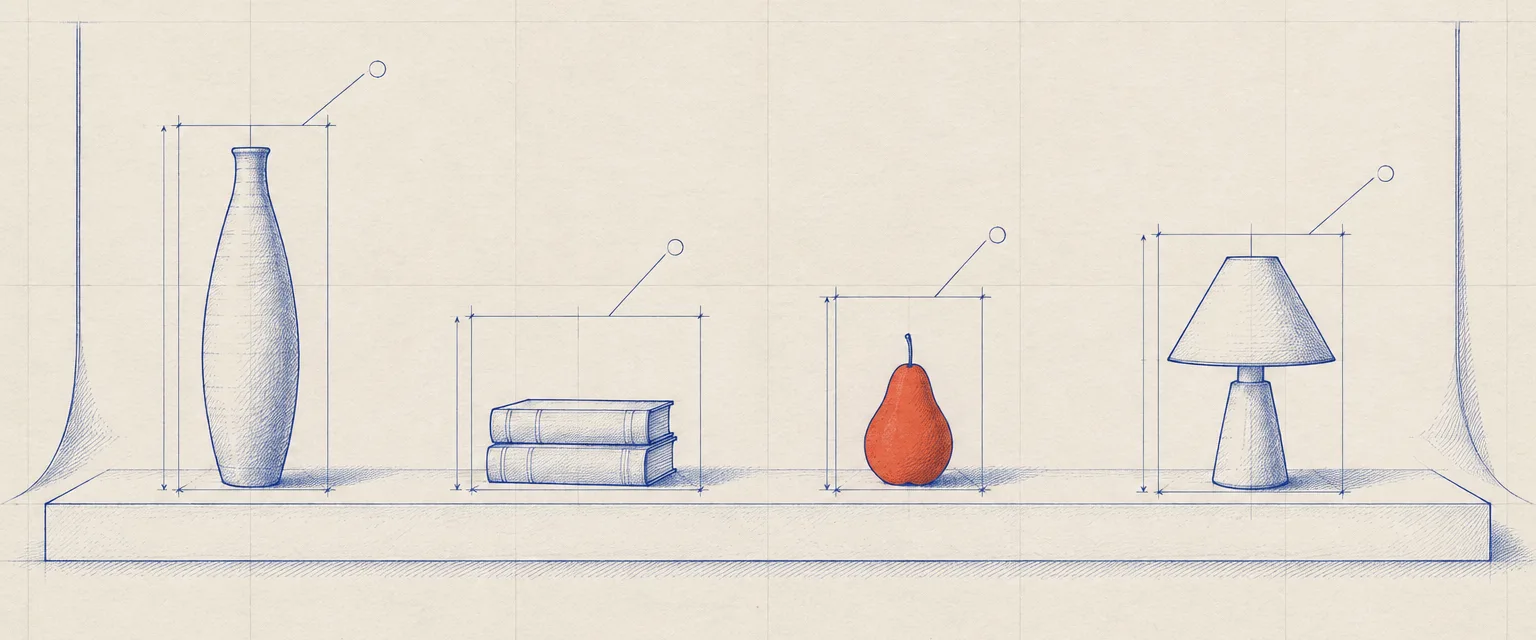
| Object | T | L | B | R |
|---|---|---|---|---|
| 192 | 116 | 769 | 215 | |
| 489 | 306 | 769 | 456 | |
| 461 | 544 | 769 | 641 | |
| 364 | 754 | 769 | 854 |
Top, left, bottom, right: the order FLUX 3 reads a box. Hover or focus a row to find it on the plan.
Studio
The Set Plan
Portfolio pages drafted like a set plan: every object boxed, measured, and numbered before the light goes on.
- Set plan
- the drawing of a shoot before it happens
- Elevation
- a straight-on view with no perspective
- Construction box
- the frame that fixes one object's extent
- Leader line
- the stroke from a label to its object
- Box schedule
- the table of every box's coordinates
- Normalized grid
- 0 to 1000 whatever the pixel size
Today's art direction borrows from theatre and product-photography set plans: orthographic elevations where every prop gets a box, a dimension, and a leader line before anyone lights it. On the web that becomes a portfolio page whose hero image carries live annotation boxes, a schedule list that cross-highlights them, and filled category tags in place of section numbers.
Featured work
FLUX 3 Image takes a layout, then edits it one box at a time
Boxes go at the end of the prompt
FLUX 3 Image, documented on October 1, generates from text, edits a named detail, and combines up to ten reference images. To control composition you add bounding boxes after the prompt, one per element, written as top, left, bottom, right on a 0 to 1000 grid.
The same boxes scope an edit
Black Forest Labs says a box can recolor, move, replace, or remove one element while everything outside it stays unchanged. That turns a regenerate-and-hope loop into something closer to selecting a layer.
Grounding is on by default
The model searches the web and images before it renders, so a real poster or product comes out closer to the real thing; turning grounding off trades that for speed. Output runs up to 4K across fifteen aspect ratios from 21:9 to 9:21, and the July FLUX 3 video release covered the motion half of the family.
Each box is [top, left, bottom, right] on a 0 to 1000 grid.
FLUX 3 Image documentation
Services
Tooling and technique
Tooling
Apple puts Wallet pass design in a Mac app
Pass Designer, a beta for macOS 27, lets you build store cards, event tickets, and boarding passes with a live preview that uses the same rendering as iPhone and Apple Watch. It validates the pass as you work and lets you edit semantic tags, the structured event and venue data behind Calendar and Maps features, without writing the JSON by hand.
Technique
Write the layout as numbers, not adjectives
The FLUX 3 prompt guide asks for the subject, setting, light, and framing in words, then each element's box appended at the end. With several references, name each by position, so image 1 is the scene and image 2 supplies the object that goes in it.
Process
Workflow: a painting you can replay stroke by stroke
stillwet gives AI models a simulated oil-paint canvas: the model writes every brushstroke as code, the simulation lays the paint, and the studio replays each painting sped up. It holds 75 paintings so far, including Claude Opus 5.5 working after Caspar David Friedrich and GPT-6.1 Sol painting with only the pigments Edward Hopper is documented using.
For anyone directing images, the useful part is the record: a stroke list is an edit history you can read, which a single generated bitmap never gives you.
Studio method
Borrow this pattern: hotspots on a 0 to 1000 grid
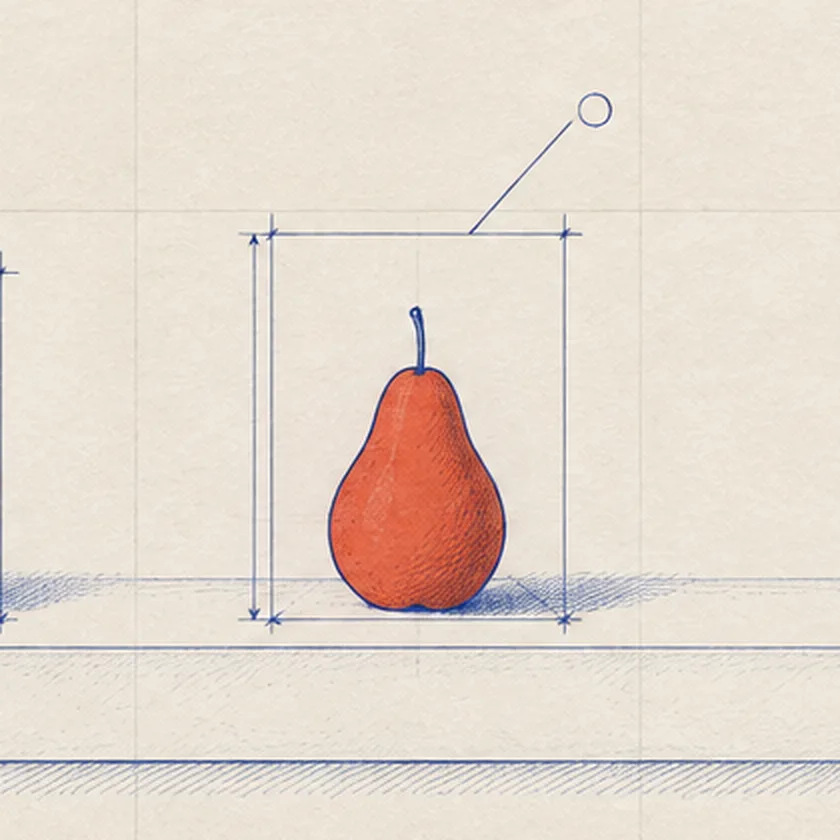
Annotate an image with boxes stored as four numbers on a 0 to 1000 grid, and let CSS place them.
Wrap the image in a box with a fixed aspect ratio, give each overlay its coordinates as custom properties, and divide by ten to get percentages. The annotations stay locked to the image at every width, a product tour or case study can reuse them, and the same four numbers can be handed straight to an image model that reads boxes.
Keep it honest: the overlay labels are real text, so they stay readable and translatable, and they repeat in a list next to the image for anyone who cannot see the picture.
.stage { position: relative; aspect-ratio: 2 / 1; }
.box {
  position: absolute;
  top:    calc(var(--t) * .1%);
  left:   calc(var(--l) * .1%);
  height: calc((var(--b) - var(--t)) * .1%);
  width:  calc((var(--r) - var(--l)) * .1%);
}
<div class="box" style="--t:514;--l:544;--b:771;--r:641">
Commission
Prompt Lab: commission this page
Paste this brief into an AI site builder to rebuild the studio case-study page, set plan and all.
- Drawing
- Studio case-study page
- Ground
- #1F1A16 umber
- Ink
- #2E44D8 ultramarine
- One object
- #E2552F vermilion
- Type
- Archivo Expanded, Merriweather Sans, DM Mono
- Works in
- Claude, v0, Lovable, Framer AI, Webflow AI, Beaver Builder AI
Build a portfolio case-study landing page for a still-life and set-design studio, drawn as a set designer's construction plan.

Ground: dark warm umber #1F1A16 with raised panels in #2A231E. Text cream #EFE7D8, secondary text #C9BFAE. Ultramarine #2E44D8 is the governing colour: the masthead spine, every category tag, buttons, and annotation boxes. One vermilion #E2552F reserved for a single highlighted object. Behind the hero, faint cream topographic contour lines at about 7 percent opacity; no grain, no glow, no gradients.

Type: a wide grotesk display (Archivo at width 125, weight 800) for the H1, section titles, and the studio name; a humanist sans body (Merriweather Sans 400, italic for one pullquote and emphasis only) at 19px with 1.7 line height and 60 to 70 character lines; DM Mono for labels and coordinates.

Structure: an 84px ultramarine vertical spine fixed on the left as the masthead, holding the issue number and the date set vertically. A plain top nav. The hero is a row of filled ultramarine category tags, a 17ch headline, a deck, then a pair: a cream drafting-film plate holding a technical drawing of the set (8 columns) beside a box schedule list (4 columns). Every object in the drawing gets a live overlay box positioned from four numbers on a 0 to 1000 grid (top, left, bottom, right) using custom properties and calc percentages; each schedule row is a button that outlines and tints its box on hover or focus via :has().

Sections each open with one filled ultramarine tag (Featured work, Services, Process, Studio method, Commission) above a wide grotesk h2. The featured case study is prose on the left with a sticky raised meta card on the right (Client, Medium, Shipped, Grid). Services sit in two columns under 2px ultramarine top rules. The method section pairs a square detail of the drawing with its own overlay box beside a short code snippet. Close with a cream brief sheet holding a copy button, a numbered sources list, and a colophon.

Image: one technical drawing in fine ultramarine ink on cream drafting film, orthographic elevation, each object in a dimensioned construction box, one object filled in vermilion; no legible text or numbers in the image. On mobile the spine becomes a horizontal strip at the top and every two-column block stacks.

Guardrails: body text never under 18px, WCAG AA contrast on every label against its real background, radii no larger than 6px, one tight shadow on the plate only, hover and focus states at 150 to 180ms with a prefers-reduced-motion guard, no fake inputs, no neon, no purple-blue gradients.
Notes
Field note
Art direction has always been a set of boxes someone drew before the shoot. Now the model reads the plan too, and the edit stays inside the line.
Credits
Sources
- FLUX 3 Image overviewBlack Forest Labs documentation, October 1, 2026
- FLUX 3 Image: Maximum control over every pixelBlack Forest Labs, product page
- Introducing Pass DesignerApple Developer, beta for macOS 27
- stillwet: paintings by AI modelsstillwet, Show HN, October 1, 2026